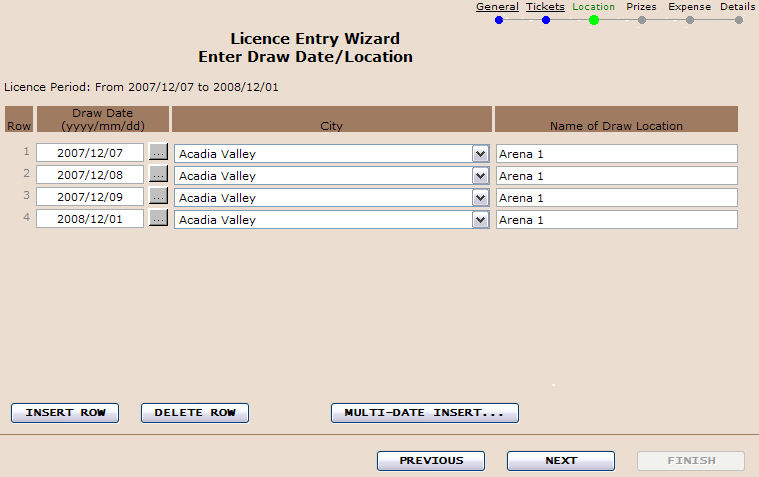
Enter the draw dates and locations. Insert a row for each draw date.
|
Draw Location: |
Enter the facility name and address where the raffle will be held. |
|
City: |
Select the town or city name from the drop down list. |
|
Draw Date: |
The drop down window will display current contact names associated with the charity. If the name does not appear in the drop down window choose Find to locate/create the proper contact. |
|
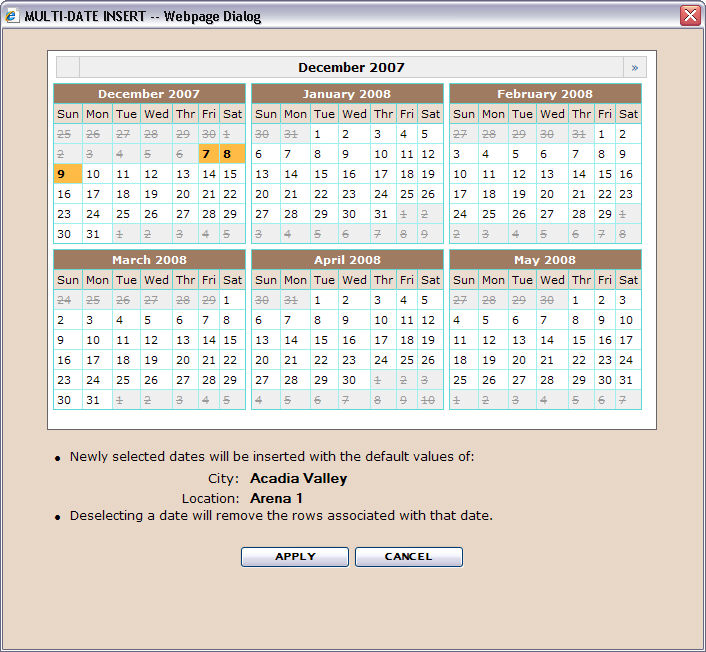
Clicking the MULTI-DATE INSERT... Button, will launch a response window which will permit the user to add or remove dates from the calendar. When the APPLY Button
|
City Selection:
Type in the first letter of the town or city name, use the dropdown window to choose the correct name or continue to type the first letter until the name appears in the column.
Multiple draws on a given date:
Example: if there is a 50/50 draw after each soccer game, add the game description to the Location, i.e. "Millennium Place - Game 1".
Also See,
Insert/Delete Rows
Previous/Next/Finish Buttons
Step Indicator Links

 is clicked, the system will INSERT/DELETE your selection of dates from the calendar.