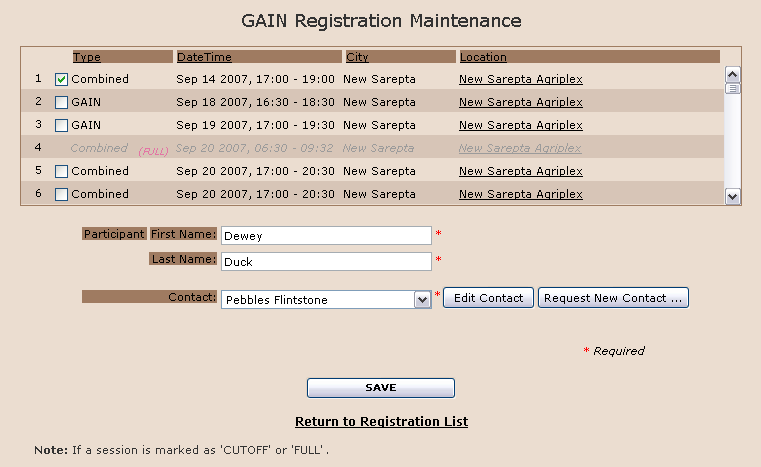
This screen is used to Add or Update the registration details for a session.
To select a Session:
Scroll the session list to display the desired session.
Click the Checkbox on the left side of the session list to select the session to register.
Enter Participant first and last name.
Use the drop down menu to select the contact person.
Click Edit Contact button will open the GAIN Contact Maintenance screen.
Click Request New Contact button will open New Contact Request screen.
Click the Save button to complete the registration for the session.
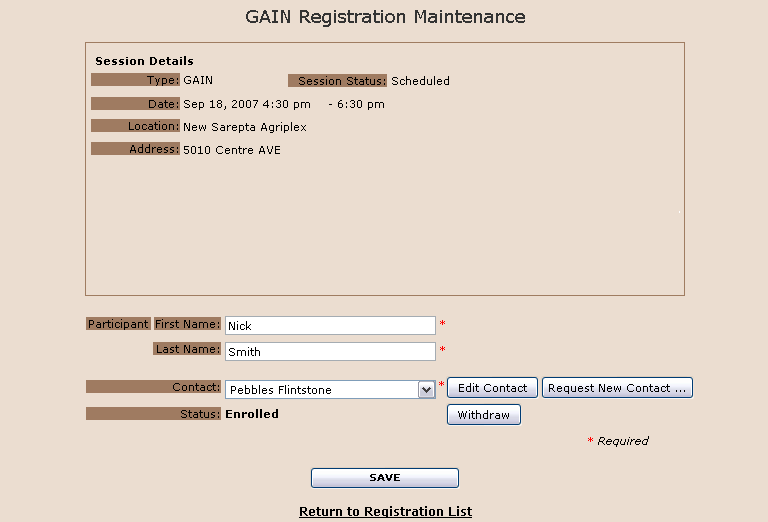
In edit mode the screen is very similar to Add mode with the following exceptions:
the selected session cannot be modified
Details for the associated session are displayed. To change to a different session you must withdraw from this registration and then add a different registration.
A Withdraw Button is now available.
|
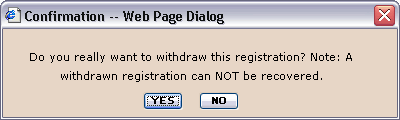
Clicking the withdraw button,
Click Yes button to proceed the withdraw. Click No button to cancel the withdraw and return to Registration Maintenance screen |
|
Type: |
The type of information session. (See GAIN Session Description) |
|
DateTime: |
Date of the session |
|
City: |
City location of the session |
|
Location: |
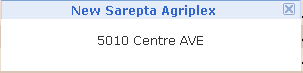
Location of the session and can click on location name to display location address
|
Registration Columns
|
First Name: |
Enter participant first name |
|
Last Name: |
Enter participant last name |
|
Contact: |
Use the drop down menu to select the contact person. |
|
Status (Edit mode only): |
|
Slow Page Loading
Note:Some virus scanners that perform script scanning may cause this page to load slowly.
Also See,
GAIN Session Description will launch the following response window for confirmation.