

An EAServer transaction is a transaction whose boundaries and outcome are determined by EAServer. Components can be marked as transactional in EAServer Manager. If a component is transactional, the EAServer transaction manager ensures that the component’s third-tier database queries execute as part of a transaction. Multiple components can participate in an EAServer transaction; the EAServer transaction manager ensures that all database changes performed by the participating transactions are all committed or rolled back.
All transactions are defined by the ACID test:
Atomic If a transaction is interrupted, all changes that the transaction has made are cancelled or rolled back.
Consistent A transaction produces results that preserve invariant properties.
Isolated A transaction’s intermediate states cannot be monitored or changed by other transactions; transactions execute their results one after another.
Durable The changes that a transaction completes are permanent.
In EAServer Manager, you can declare EAServer components to be transactional. When a component is transactional and uses the EAServer connection management feature, commands sent on a third-tier database connection are automatically performed as part of a transaction. Component methods can call EAServer’s transaction state primitives to influence whether EAServer commits or aborts the current transaction.
The component lifecycle is tightly integrated with EAServer’s transaction model. Component instances that participate in a transaction are not deactivated until the transaction ends or until the component indicates that its contribution to the transaction is over (that is, its work is done and ready for commit or that its work must be rolled back). An instance’s time in the active state corresponds to the beginning and end of its participation in a transaction.
The benefits of using transactions to group database updates are clear. You can easily code methods in a single component to implement transactions that run against a single data source. However, those methods may in turn be executed by another component, which itself is defining a transaction. In this situation, error recovery becomes difficult. For example, consider the following scenario in which an Enrollment component calls both Registrar and Billing components:
In the following figure, the Enrollment.enroll() method calls methods in the Registrar and StudentBilling components:
Registar.reserveSeat() checks that a seat is available. If so, it decrements the count of available seats and adds the student to the course’s enrollment list. If no seats are available, reserveSeat() fails.
StudentBilling.addToBill() checks that the student has a billable credit record. If so, addToBill() adds the course cost to the student’s bill for that semester. If the student has a credit problem (if, for example, she owes money for an overdue book), addToBill() fails.
Figure 2-2: An example EAServer transaction
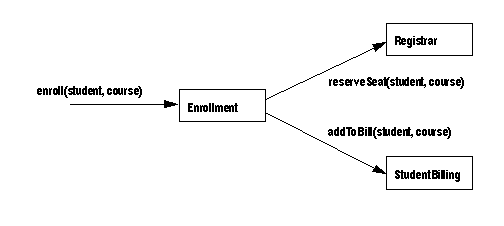
To be correct, both the database update made by the Registrar and the update made by the StudentBilling components must occur, or neither must occur. In other words, if the student cannot be billed, the course’s available seats must not be changed. To handle this case, you could add logic to the enroll() method to undo changes (requiring an unreserveSeat() method in Registrar). However, as more components are added to the scenario, the logic needed to undo previous changes quickly becomes unmanageable. It is much easier to define all the participating components to use EAServer transactions. Then an error in any component can induce a rollback of all changes made by the other participating components before the error occurred.
By defining the participating components to use EAServer transactions, you can be sure that the work performed by the components that participate in a transaction occurs as intended.
 Defining how a component participates in transactions
Choose a transaction coordinator. The transaction coordinator manages the flow of transactions that involve more than one connection. “Transaction coordinators” describes the available options.
Specify the component’s transaction attribute. Each component has a transaction attribute that determines whether instances of the component participate in transactions. “Transactional component attribute” describes the attribute settings and their meanings.
Code methods to call EAServer’s transaction state primitives. Each method should call the appropriate transaction state primitive to reflect the state of the work that the component has contributed to the transaction. “Using transaction state primitives” describes the state primitives in detail.
Specify a transaction timeout period if needed. By default, transactions are never timed out. You can configure a finite timeout period in EAServer Manager. See “Transaction Timeout property” for more information.
All components installed in one server share the same transaction coordinator.
Choices for transaction coordinator include:
Java Transaction Service (JTS) This option complies with the JTS and the Object Transaction Service (OTS) and X/Open Architecture (XA) standards. The JTS transaction coordinator integrates the functionality of the shared connection, OTS/XA, and JTS/JTA transaction modes, and uses two-phase commit to coordinate transactions among multiple databases.
Microsoft Distributed Transaction Coordinator (DTC) DTC uses two-phase commit to coordinate transactions among multiple databases. DTC is available on Windows 2000 and Windows NT platforms as part of Microsoft SQL Server 6.5 or later versions.
DTC transaction support in EAServer requires the following:
Microsoft DTC must be installed and running on the server host.
Any database servers used by your application must be DTC- compliant.
Your components must connect to the DTC-compliant databases using an ODBC connection cache or a JDBC connection cache that uses the JDBC-ODBC driver.
 To verify
that your EAServer edition supports two-phase commit, check the
server console or the $JAGUAR/bin/<server_name>.log file.
To verify
that your EAServer edition supports two-phase commit, check the
server console or the $JAGUAR/bin/<server_name>.log file.
The default coordinator is the JTS coordinator. To view or change the coordinator, use the Server Properties dialog box in EAServer Manager.
More transaction coordinators may be added in the future. The components you create now will not have to be changed to take advantage of the new transaction coordinators as they become available.
Components in EAServer have a transaction attribute that indicates how a component participates in transactions. You can view and change a component’s transaction attribute using EAServer Manager; the attribute is displayed on the Transactions tab in the Component Properties window. For PowerBuilder components, you can specify the attribute in the PowerBuilder wizards (doing so ensures that it is saved with the PowerBuilder project and not overwritten by redeployment). The attribute has the following values:
Not Supported The Default. The component’s methods never execute as part of a transaction. If the component is activated by another component that is executing within a transaction, the new instance’s work is performed outside of the existing transaction.
Supports Transaction The component can execute in the context of an EAServer transaction, but a connection is not required in order to execute the component’s methods. If the component is instantiated directly by a base client, EAServer does not begin a transaction. If component A is instantiated by component B, and component B is executing within a transaction, component A executes in the same transaction.
Requires Transaction The component always executes in a transaction. When the component is instantiated directly by a base client, a new transaction begins. If component A is activated by component B, and B is executing within a transaction, then A executes within the same transaction; if B is not executing in a transaction, then A executes in a new transaction.
Requires New Transaction Whenever the component is instantiated, a new transaction begins. If component A is activated by component B, and B is executing within a transaction, then A begins a new transaction that is unaffected by the outcome of B’s transaction; if B is not executing in a transaction, then A executes in a new transaction.
Mandatory Methods may only be invoked by a client that has an outstanding transaction.
Bean Managed Uses EJB 1.1 transactional behavior. The component cannot inherit a client or other component’s transaction. The component can execute without a transaction or explicitly begin, commit, and roll back transactions by using the javax.transaction.UserTransaction interface (for EJB components) or the Current interface (for C++ components).
OTS Style Uses OTS transactional behavior. The component can inherit a client or other component’s transaction. If called without a transaction, the component can explicitly begin, commit, and roll back transactions by using the CORBA Current interface.
Current interface and OTS-style are incompatible
Although you can set a Java-CORBA component's transaction
attribute to OTS Style, you will not have access to the Current interface.
Since an OTS-style component can inherit a transaction from a parent
component, the component behaves as in the Supports Transactions
attribute case.
Table 2-1 lists design scenarios and the transaction attributes that apply to each.
For example, in the scenario illustrated in “A transaction involving multiple components”, the Enrollment component must be marked Requires Transaction or Requires New Transaction, since it calls methods in the Registrar and StudentBilling components, and the work performed by the called components must be grouped in a single transaction. Both Registrar and StudentBilling must be marked Supports Transaction or Requires Transaction so that their database updates can be grouped in the transaction begun by the Enrollment component.
Transaction Not Supported is useful when your component performs updates to a noncritical database. For example, consider a component whose sole function is to log usage statistics to a remote database. Since usage statistics are not mission-critical data, you can choose Not Supported as the component’s transaction attribute to ensure that the logging updates do not incur the overhead of using two-phase commit.
After a base client instantiates a transactional component, the first method invocation begins an EAServer transaction. This instance is said to be the root instance of the transaction. If the root instance invokes methods in other transactional components, those components join the existing transaction.
The outcome of the transaction is determined by how the participating components call the transaction state primitives discussed in “Using transaction state primitives”.
Use a stub or proxy object for the called
component
For transactions to occur with the intended semantics, you
must perform intercomponent calls using a stub or proxy object for
the called component. Do not invoke another component’s
methods directly.
EAServer provides transaction state primitives that methods can call to direct the outcome of the current transaction. Each component model provides an interface containing methods for these primitives. Table 2-2 lists the API mappings for each component type.
These methods end a component’s participation in a transaction (both cause the current instance to be deactivated):
completeWork The component finished its work for the current transaction and should be deactivated when the method returns.
rollbackWork The component cannot complete its work. Doom the current transaction and deactivate the instance when the method returns.
These methods are used to maintain state after the method returns (they delay deactivation of the component instance):
continueWork Continue this component’s participation in the current transaction after the method returns, and allow the transaction to be committed if the component is deactivated. If a method calls no transaction primitive, this is the default behavior.
disallowCommit Continue this component’s participation in the current transaction after the method returns, but roll back the transaction if the component is deactivated before calling another primitive besides disallowCommit.
These primitives can be used to query the state of the transaction (if any) in which the method is executing:
isInTransaction Query whether the current method is executing in the context of a transaction.
isRollbackOnly Query whether the current transaction is doomed to be rolled back or is still viable.
The following table describes how the transaction primitives are invoked in Java and PowerBuilder components. For information on the Java methods, see Chapter 1, “Java Classes and Interfaces,” in the EAServer API Reference. For information on the PowerBuilder TransactionServer object, see the Application Techiques manual in the PowerBuilder documentation and the PowerBuilder online help.
ActiveX, C, and C++ components call the methods and routines in the following table to invoke transaction primitives. See the EAServer API Reference for documentation of these methods and routines:
Any participating component can roll back the transaction by calling the rollbackWork primitive; Java components can also cause a rollback by returning an unhandled exception. Only the action of the root component determines when EAServer commits the transaction. The transaction is committed when the root component returns with a state of completeWork and no participating component has set a state of disallowCommit.
You can use the transaction state primitives in any component; the component does not have to be declared transactional. Calling completeWork or rollbackWork from methods causes early deactivation. “Supporting early deactivation in your component” discusses how this feature can improve application performance.
The root instance’s Transaction Timeout property specifies the maximum duration of an EAServer transaction. The default timeout period is infinite. You can configure finite timeouts in EAServer Manager, as described in “Component properties: Resources”.
A transaction begins when a base client activates a transactional component; this component is the root component of the transaction. The root component’s Transaction Timeout property determines the maximum duration of the transaction.
If the transaction is not committed or rolled back within the allotted time, it is automatically rolled back. In this case, the client receives the CORBA TRANSACTION_ROLLEDBACK exception when it tries another method invocation. The client’s object reference remains valid, and the transaction can be retried.
Transactions are never rolled back in the middle of a method invocation. If the timeout occurs during a method invocation, and the method does not commit the transaction, the transaction is rolled back when the invocation completes.
When using the UserTransaction interface,
the default timeout for transactions is 300 seconds (five minutes).
To change this value, edit the UserTxnManager.props file,
located in the EAServer Repository/Component/CosTransactions subdirectory,
and set the value of the com.sybase.jaguar.component.tx_timeout property.
A value of “0” means no timeout exists. You can
also set the timeout value from a client (within a transaction it
initiated) or in a bean-managed server component with the UserTransactions method setTransactionTimeout(secs).
As discussed in “Benefits of using EAServer transactions”, EAServer transactions are most useful when your application uses intercomponent calls.
As an example, consider the scenario illustrated in “A transaction involving multiple components”. The pseudocode below shows the logic used to ensure that the work performed by the Registrar.reserveSeat() and StudentBilling.addToBill() occurs within the same transaction.
In the Registrar component, the reserveSeat() method must check the number of seats. If there is space for the new student, then the method adds the student, decrements the count of available seats, and sets a state of completeWork. If a seat is not an available, the method calls rollbackWork to roll back the current transaction.
Here is the pseudocode for Registrar.reserveSeat():
check number of seats
if enough seats
  decrement number of seats
  add student to enrollment list
  completeWork
else
  rollbackWork
end if
The transaction attribute for Registrar must be Requires Transaction so that the query for available seats and the update of available seats always occur in the same transaction.
In the StudentBilling component, the addToBill() method must verify the student’s credit. If the student does not already owe money, the method adds the cost to the semester bill and sets a state of completeWork. If the student owes money, the method calls rollbackWork to roll back the current transaction. Here is the pseudocode for StudentBilling.addToBill():
check student’s balance
if balance > 0
  add cost to bill
  debit balance
  completeWork
else
  rollbackWork
end if
The transaction attribute for StudentBilling must be Requires Transaction so that the balance query, the billing calculation, and the debit of the student’s balance always occur in the same transaction.
In the Enrollment component, the enroll() method first calls Registrar.reserveSeat(). After Registrar.reserveSeat() returns, the method checks whether the transaction is still viable using the isRollbackOnly primitive. If the transaction is viable, the method calls StudentBilling.addToBill(). Here is the pseudocode for Enrollment.enroll():
invoke Registrar.reserveSeat()
if isRollbackOnly returns true
  return
else
  invoke StudentBilling
  completeWork
endif
The transaction attribute for Enrollment must be Requires Transaction so that the work done by StudentBilling and Registrar occurs as a single transaction.
EAServer supports dynamic enlistment for bean-managed transactions, which allows you to create a connection in one method of a stateful bean, use the connection in another method, and close the connection in a third method.
For a JDBC 2.0 shared connection (PooledConnection), the container manages the single connection’s enlistment and deenlistment in transactions.
For XA connections, the Object Transaction Service libraries need to know all the resources that will participate in a transaction when it starts. If you get an XAConnection before you start a transaction, EAServer enlists the XAConnection in the transaction. If you start a transaction before you create an XAConnection, EAServer creates the connection and enlists it in the transaction.
Dynamic enlistment allows you to do this:
conn1 = ds1.getConnection();
// A
user_transaction.begin();
//
conn2 = ds2.getConnection();
conn3 = ds3.getConnection();
// B
conn2.close();
//
user_transaction.commit();
// C
conn3.close();
conn1.close();
Where at these points, the following are true:
A – conn1 is not part of any transaction.
B – conn1, conn2, and conn3 are part of the user_transaction.
C – conn1 and conn3 are not part of any transaction.
Earlier versions of EAServer required you to get and release connections within a single component method. In bean-managed transactions, you had to get and release a connection within the scope of a transaction.
You can get only one connection per resource. Each getConnection call for the same database returns the same connection.
XA performance diminishes when connections span across
methods.
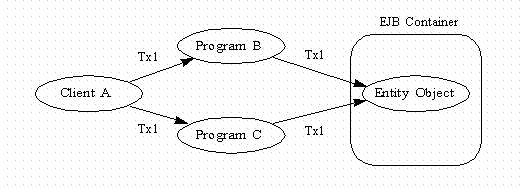
An entity object accessed from more than one path in the same transaction, as shown in Figure 2-3, is called a diamond. A local diamond exists when the access paths originate from, and the entity object resides on, the same server.
Typically, EAServer uploads data from the database at the beginning of a transaction and downloads data to the database at the end of a transaction. When more than one program accesses a session bean within the same transaction, this can lead to inconsistent views of the data. For instance, if Program B updates the entity’s data and then Program C reads the data, Program C does not see the changes made by Program B. To solve this problem, when EAServer detects a diamond, it uploads data at method invocation and downloads data when the method completes.
Figure 2-3: Entity object diamond
| Copyright © 2005. Sybase Inc. All rights reserved. |
|
|